
On Anthropic's Messages API, a request without cache_control doesn't get cached. Anthropic's documentation describes caching as something you opt into with cache_control, either at the top level or on individual blocks. OpenAI works the other way: prompt caching is enabled by default for supported OpenAI models. On its newer models, you can also place cache breakpoints yourself or let OpenAI choose where they go. It's written for developers who send the same long system prompt, tool definitions or documents on every call and want to know how each cache behaves before relying on it.
Turning the Cache On: Implicit Placement vs Explicit Opt-In
Anthropic's prompt caching page says you can cache prompt prefixes with cache_control using automatic caching or explicit breakpoints. Automatic caching is a single top-level field. Explicit breakpoints go on individual content blocks. You can define up to 4 cache breakpoints, and when you combine the two methods, the automatic breakpoint uses one of the 4 available slots. The recommended layout is to put static content such as tool definitions, system instructions, context and examples at the start of the prompt, then mark where the reusable part ends.
The order matters because Anthropic builds prefixes in a fixed sequence: tools, then system, then messages. A cache hit needs 100 percent identical prompt segments, including all text and images, up to and including the block marked with cache control. One easy-to-miss trap: changing thinking parameters invalidates cached message prefixes, and can also invalidate cached system prompts and tools.
There's one exception to opt-in. On Anthropic's Managed Agents product, caching usage is listed as "Always on".
OpenAI asks for less setup. Once a prompt passes the minimum cacheable length, you can place breakpoints explicitly or let OpenAI place them implicitly, depending on the model. The routing hint prompt_cache_key changes role across versions. Before GPT-5.6 you use it to improve cache routing. On GPT-5.6 and later it is optional and not needed to optimize caching.
How Long a Cached Prefix Survives
Anthropic's cache has a default minimum lifetime of 5 minutes, refreshed each time the cached content is used. If that's too short, Anthropic also offers a 1-hour TTL. In practice, a chat or agent loop that keeps sending requests inside that window keeps the prefix cached, and a job that pauses for longer loses it. The lifetime is measured from the start of the request that writes or reads the cache entry, not from the end of its response, so a long streamed answer uses up part of it.
OpenAI's default is longer. For GPT-5.6 and later, writes use a default 30-minute lifetime, and the Responses API lets you pick a 12-hour minimum lifetime. OpenAI also says it may retain entries longer than the requested minimum, and that "12h" does not set a deletion deadline. Treat both numbers as minimums, not expiry times.
What the Cache Costs
OpenAI publishes its write and read rates as multiples of the normal input price. On GPT-5.6 and later, a cache write costs 1.25× the standard uncached input rate for the 30-minute lifetime, and the 12-hour option costs 2.5× ordinary input. Those are total write rates, not surcharges added on top of ordinary input. Reads cost 0.1× the ordinary input rate on most of these models and 0.05× on GPT-6.1 Sol and GPT-6.1 Terra, whichever lifetime you chose.
OpenAI also works through how quickly caching pays off. At the 0.1× read rate with 30-minute writes, writing a prefix once and reusing it fully once costs 1.35× its ordinary input cost, versus 2× without caching. Over ten requests, one write and nine full reads cost 2.15×, versus 10× uncached.
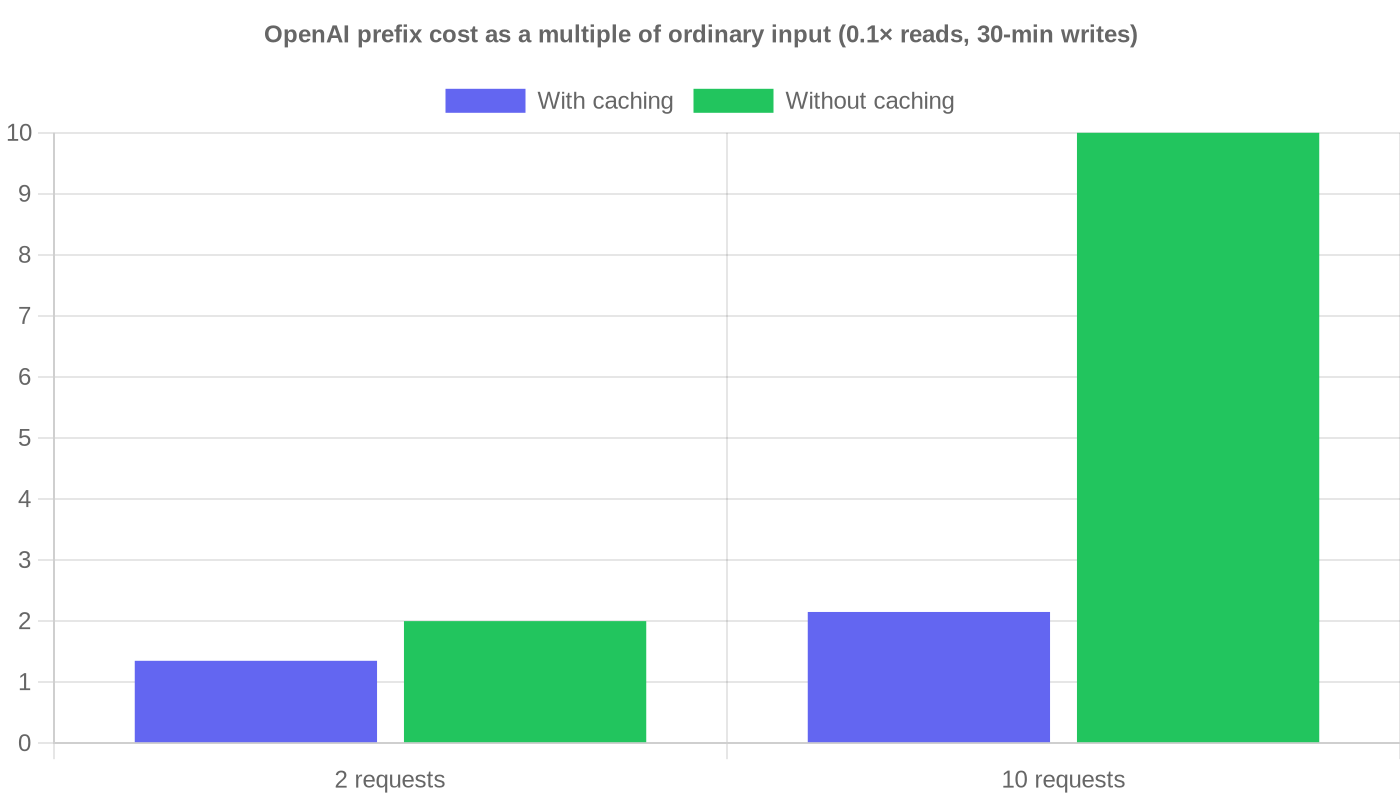 OpenAI prefix cost as a multiple of ordinary input (0.1× reads, 30-min writes)
Anthropic also states its rates as multiples of the base input price. Cache writes with a 5-minute TTL are 1.25 times the base input price, and 1-hour writes are 2 times. Cache reads are 0.1 times the base input price, with per-model exceptions listed in its pricing table.
Anthropic explains the rest of its billing through the usage object. Cache breakpoints are free. A request reports cache_read_input_tokens, cache_creation_input_tokens and input_tokens separately. In Anthropic's example, those add up to a total of 200,050 tokens, and Anthropic calls that breakdown critical for understanding both your costs and rate-limit usage. OpenAI provides a similar breakdown. In the Responses API, cache writes are split into ttl_30m_tokens and ttl_12h_tokens, and cached_tokens counts billed reads and excludes tokens charged as writes.
Minimum Prompt Size and Isolation
You have to clear a minimum prompt size before caching applies at all. On OpenAI, the minimum cacheable prompt length is 1,024 tokens for GPT-5.6 and later, and OpenAI notes that shrinking a cacheable prefix below that minimum loses caching. Anthropic says prompt caching is supported on all active Claude models. Check the threshold for your specific model before assuming a short system prompt qualifies.
On Anthropic the minimum depends on the model. On the Claude API it is 512 tokens for the newest models, including Claude Opus 5.5, Claude Opus 5, Claude Sonnet 5.5 and Claude Haiku 5.5, 1,024 tokens for Claude Sonnet 5 and Claude Sonnet 4.6, and 4,096 tokens for Claude Opus 4.6, Claude Opus 4.5 and Claude Haiku 4.5.
Isolation is where Anthropic gives you the most detail. Different organizations never share caches, even for identical prompts. Caches are also isolated by workspace on the Claude API, Claude Platform on AWS and Microsoft Foundry, while Bedrock and Claude Models on Google Cloud (Google managed) isolate by organization only. OpenAI says its caches are not shared across organizations and cannot be reused across regional processing boundaries. Within one organization, OpenAI's documented tool for separating customers is prompt_cache_key, which keeps cache accounting separate for customers, users or workspaces within your application.
| Dimension | OpenAI (GPT-5.6+) | Anthropic |
|---|---|---|
| How caching starts | On by default; implicit or explicit breakpoints | cache_control, top-level or per block (up to 4 breakpoints) |
| Default lifetime | 30-minute minimum | 5 minutes, refreshed on use |
| Longer option | 12 hours (Responses API) | 1 hour |
| Write cost vs. input | 1.25× (30 min), 2.5× (12 h) | 1.25× (5 min), 2× (1 h) |
| Read cost vs. input | 0.1× (0.05× on GPT-6.1 Sol/Terra) | 0.1× (per-model exceptions) |
| Minimum prompt | 1,024 tokens (GPT-5.6+) | 512 to 4,096 tokens, by model |
| Prefix order | Static content first | tools → system → messages |
| Separation | Organization and region; prompt_cache_key for accounting | Organization always; workspace on Claude API |
| Usage fields | cached_tokens, ttl_30m/ttl_12h | cache_read / cache_creation tokens |
Which Cache Fits Your Traffic
Both caches give the biggest savings to the same kind of app: one with a large, stable prefix. They fail in different ways, though.
OpenAI is the safer choice if you don't want to manage caching yourself. Caching works without opting in, the 30-minute default handles uneven traffic, and the published multiples make the math straightforward. If the same reference material gets reused across long gaps, the 12-hour option, with its 2.5× write rate, is worth considering, since cache-read rates are the same for both lifetimes.
Anthropic suits teams that want to decide exactly where the cache boundary falls. Explicit breakpoints and the fixed tools → system → messages order give you that control. Workspace isolation on the Claude API also helps multi-tenant setups. The risk is the opt-in itself: a request missing cache_control silently pays full price. Steady agent loops work well with the refreshing 5-minute window, but workloads with long pauses should use the 1-hour TTL.
Whichever you use, check the usage fields on every deploy. A prefix that changes by a single byte loses the cache on either platform.
Sources
- developers.openai.com – "Prompt caching | OpenAI API"
- platform.claude.com – "Prompt caching - Claude Platform Docs"